

Site Assessment Tool
Download the Site Assessment Tool below!

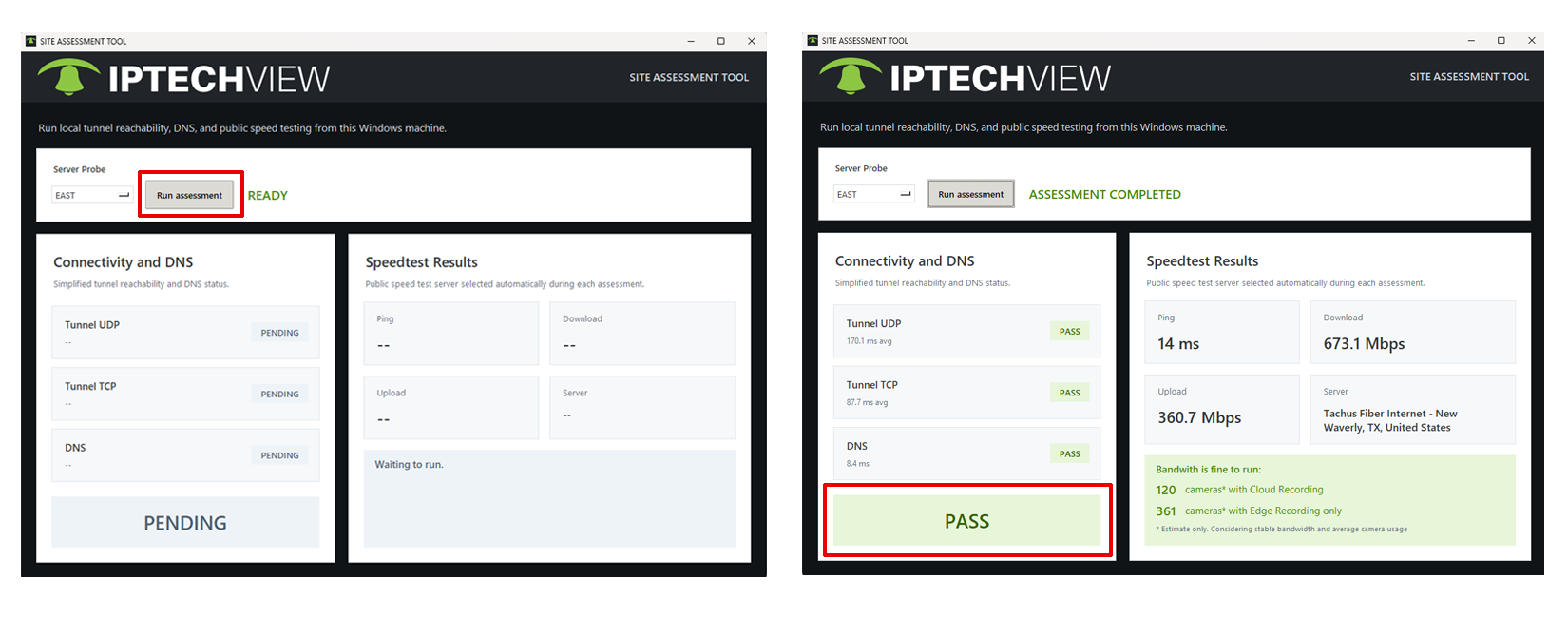
Once downloaded, double-click the .dmg (iOS) or .exe (Windows) file. Depending on your Operating system update version, it might present a security warning. Please ignore (this file is safe, created and posted by your trusted IPTECHVIEW team) and run the tool. The Site Assessment UI will pop up as seen below. Click on the Run Assessment button and give it a couple of minutes.
This will indicate whether the site or network you are running this from is PASS (ready for plug-and-play IPTECHVIEW device) or FAIL. See below for likely actions needed if any of the tests fail.
If any of the Tunnels fail
Ask your IT/Network Admin to allow the following outbound traffic:
- Domain: *.iptechview.com
- Protocol TCP Ports: 443, 444
- Protocol UDP Ports: 1194, 1294
If DNS fails
Ask your IT/Network Admin to allow passing DNS responses that contain private IP addresses. Some names for these blocks are:
- DNS Rebinding Protection
- Block private IP in DNS responses
- Prevent DNS rebinding
- Private address filtering
Contact support@iptechview.com for further help or if you need us to explain in more detail to the IT/Network Admin.